
JAMB 2026 Update on Basic UTME/DE Registration – The Joint Admissions and Matriculation Board (JAMB) has released an official notification outlining important procedures and tips for candidates registering for the 2026 Unified Tertiary Education Examination (UTME).
In an announcement through the official X handle, the Board outlined the key steps prospective candidates should take to ensure a seamless registration process.
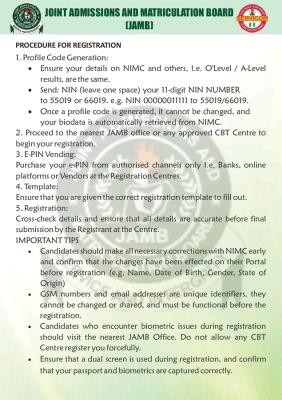
Step 1: Generate profile code
Candidates should first ensure that their personal details including their National Identification Number (NIN), email address and O’Level/A-Level results are accurate and consistent across all platforms.
- How to Generate Profile Code: Send your 11-digit NIN to 55019 or 66019 in the following format:
NIN 00000011111(make sure there is a space between the “TIN” and the number). - Important Note: Once the profile code is generated, it cannot be changed and your bio data will be automatically retrieved from the NIMC database.
Step 2: Purchase E-PIN and registration
After generating the profile code, candidates should proceed to the nearest JAMB Office or any approved CBT Center to begin registration.
- Purchase of E-PIN: E-PIN should only be purchased from authorized channels including banks, approved online platforms and accredited vendors at enrollment centers.
- Registration: Candidates should ensure that they are provided with the correct registration form and should check all details for accuracy before final submission.
Important tips
- NIMC Corrections: All necessary corrections (eg name, date of birth, gender, state of origin) must be done early with NIMC and reflected on their portal before JAMB registration commences.
- Unique Identifiers: Phone numbers and email addresses are unique for each candidate. They cannot be shared or changed and must be active throughout the process.
- Biometric Issues: If biometric registration fails, candidates should contact JAMB office immediately. Do not allow any CBT center to force you to register.
- Dual Screens: Make sure dual screen is used during check-in so you can confirm that your passport photo and biometrics have been entered correctly.
Common problems and solutions
- “Error 550/66019” / Invalid parameter:
Indicates an incorrect format. Make sure you are using the correct command:NIN [space] YourNINto 55019 or 66019. - “The number is already registered”:
This means that the phone number has already been used to generate the profile code. Candidates have to get and use that particular SIM card to get the code. - “Unable to verify NIN”:
Usually a temporary network or server problem. Candidates are advised to wait later and try again. - “Record not found”:
This means that the NIN is not in the NIMC database. Candidates should visit the nearest NIMC office for verification.
With this announcement, JAMB 2026 UTME registration will commence soon. Prospective UTME candidates are therefore advised to start their preparation using JAMB CBT software and JAMB CBT app. Also, those who wish to set up JAMB CBT training centers or re-sell JAMB CBT training software must enroll in our JAMB CBT Agent/Re-seller program.